
Home / How to buy
How to buy with CNFans, step by step, with the deciding page named
Historical CNFans tutorial: nine steps and original screens, verified on 23 September 2026. The official site still displayed a maintenance notice on 21 October. Check account availability and current terms before purchasing; old prices, promotions and allowances visible in the images are not today’s offer.
Nine steps in the official tutorial’s order, with the deciding record named along the way. A catalogue shortlists; the listing specifies; the agent records the purchase and parcel; arrival photos show what reached the warehouse.
Follow the three phases in order
Steps 1–3 prepare and pay for the purchase. Steps 4–6 cover buying, domestic delivery and warehouse checks. Steps 7–9 arrange and follow the international parcel.
- Search the product link
- Select specifications and submit
- Pay for the goods and domestic delivery
- The agent accepts the order and purchases
- The seller sends the goods to the warehouse
- Inspect the arrival photos and Warehouse record
- Select warehouse items and request outbound shipping
- Choose the route and pay international shipping
- Follow dispatch in Parcels and check delivery
Watch the official CNFans tutorial · 1 min 37 sec
The video shows the historical interface. The written steps below cover the same journey; check available methods and charges in your account.
Your purchase request
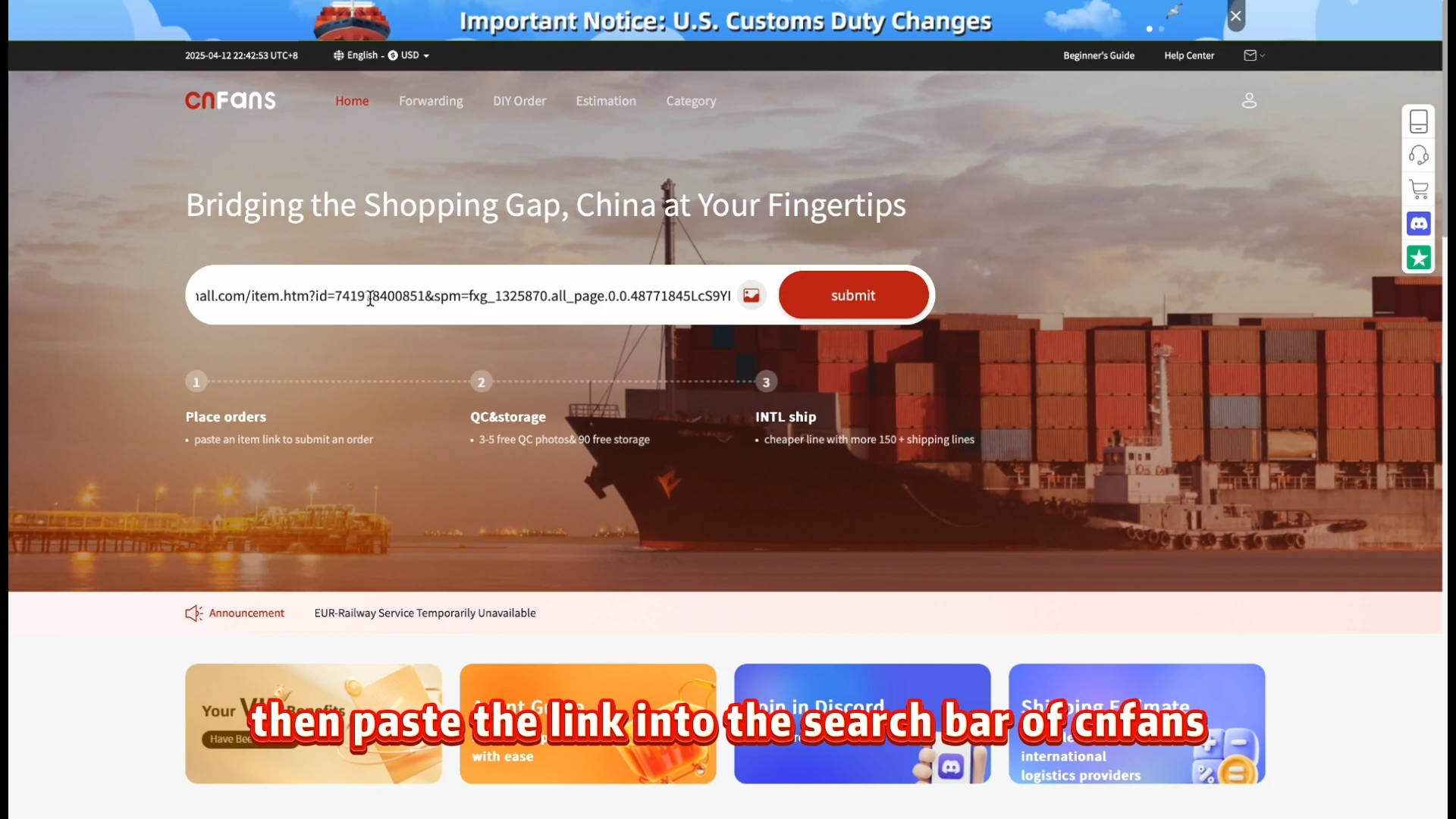
Step 1. Search the product link
Open the original seller listing, copy its product URL and search that link on CNFans. The historical official tutorial begins with this input; a spreadsheet card or category URL is only a discovery aid. Check that the imported product is the one you intended.
The historical instructions name Taobao and 1688. A listing found on another marketplace is not proof that CNFans currently accepts it. Confirm platform and product eligibility before paying.
Start in the category cards or the search box and open anything that looks right. At this stage you are only shortlisting, so collect three or four candidates rather than falling for the first photo. The card gives you a photo, a yuan price or price range and a link; that is enough to decide what deserves a closer look and nothing more.
Two habits help. Keep the candidates in one place (a notes file or a folder of links) with the date you found them, and prefer cards whose cover photo shows the item plainly rather than on a styled set. Plain photos are easier to compare later with what the warehouse sees.
Now open the listing itself. Read it from top to bottom once, slowly, before choosing anything. The parts that matter are the title, the spec menu with its prices, the detail photos and the size chart, which on many listings is an image buried among the detail photos rather than a separate section.
Look for what ships in the box, any note about pre-orders or delays, and the region the seller ships from if the page shows it. Machine translation will garble some of this; color and size words are the most likely to come out strangely, so compare the words with the photos beside them.
Take a full-page screenshot with the date. This is the record of what the seller offered.
Your purchase request
Step 2. Select specifications and submit
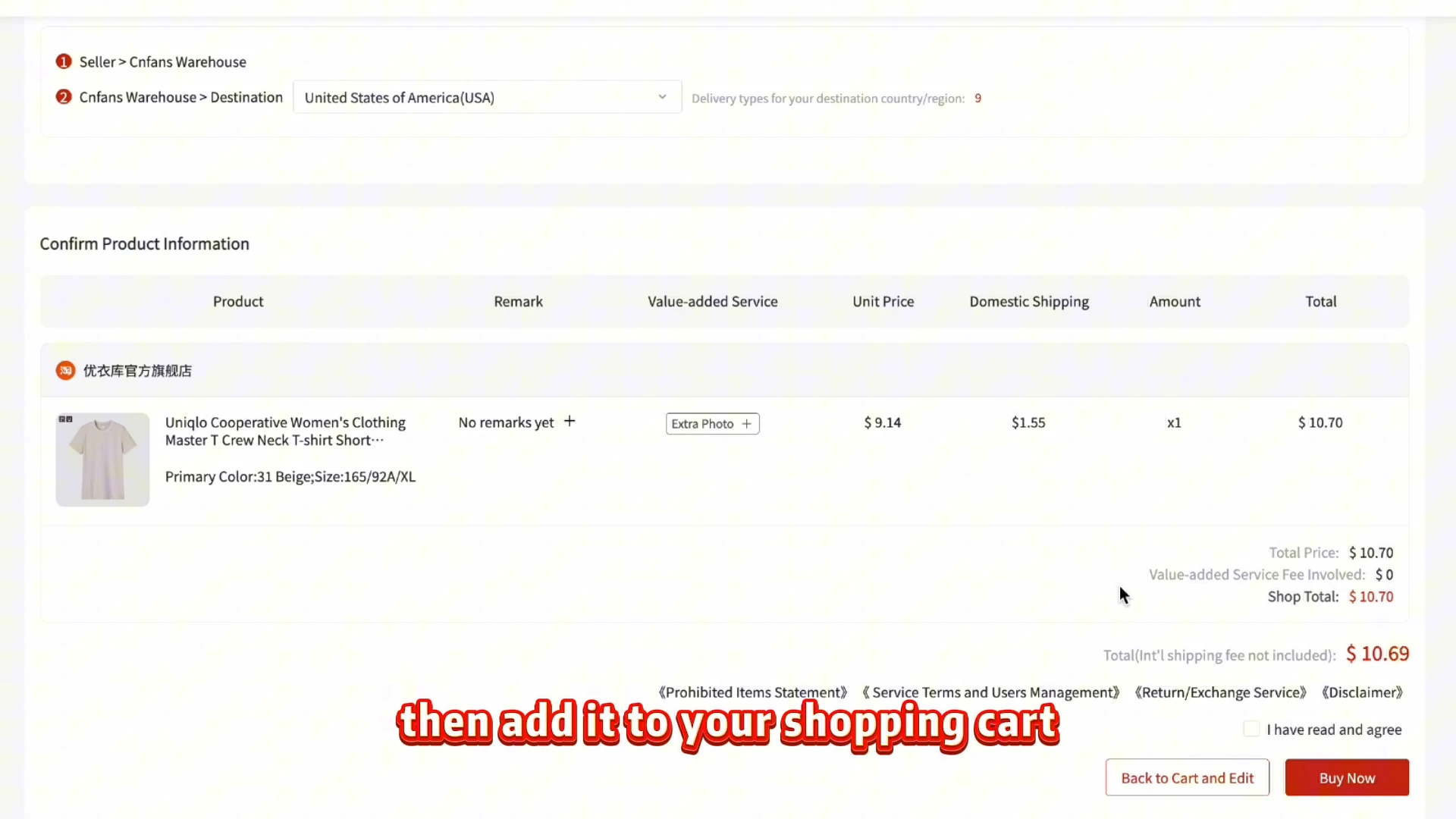
Choose the exact colour, size, version and quantity, then add the item to the cart or submit it for purchase. Compare the order summary with the seller menu, including the chosen option price, domestic delivery and any requested extra service.
The video frame shows the review stage after selection, not a demonstration of every option menu. Save the option text and a reference image; a cover containing several products does not order all of them.
A listing is many products under one link. The order only becomes specific when you choose a spec: one color and one size, sometimes plus a version such as with or without an extra piece. Write your choice down exactly as the seller spells it in the menu, Chinese characters included if that is how it appears.
Check the size chart against a garment you already own and like, measured flat. That comparison beats any letter size, because Chinese sellers size differently from one shop to the next. If the chart and the photos disagree, message the seller through the agent before ordering rather than after.
Your purchase request
Step 3. Pay for the goods and domestic delivery
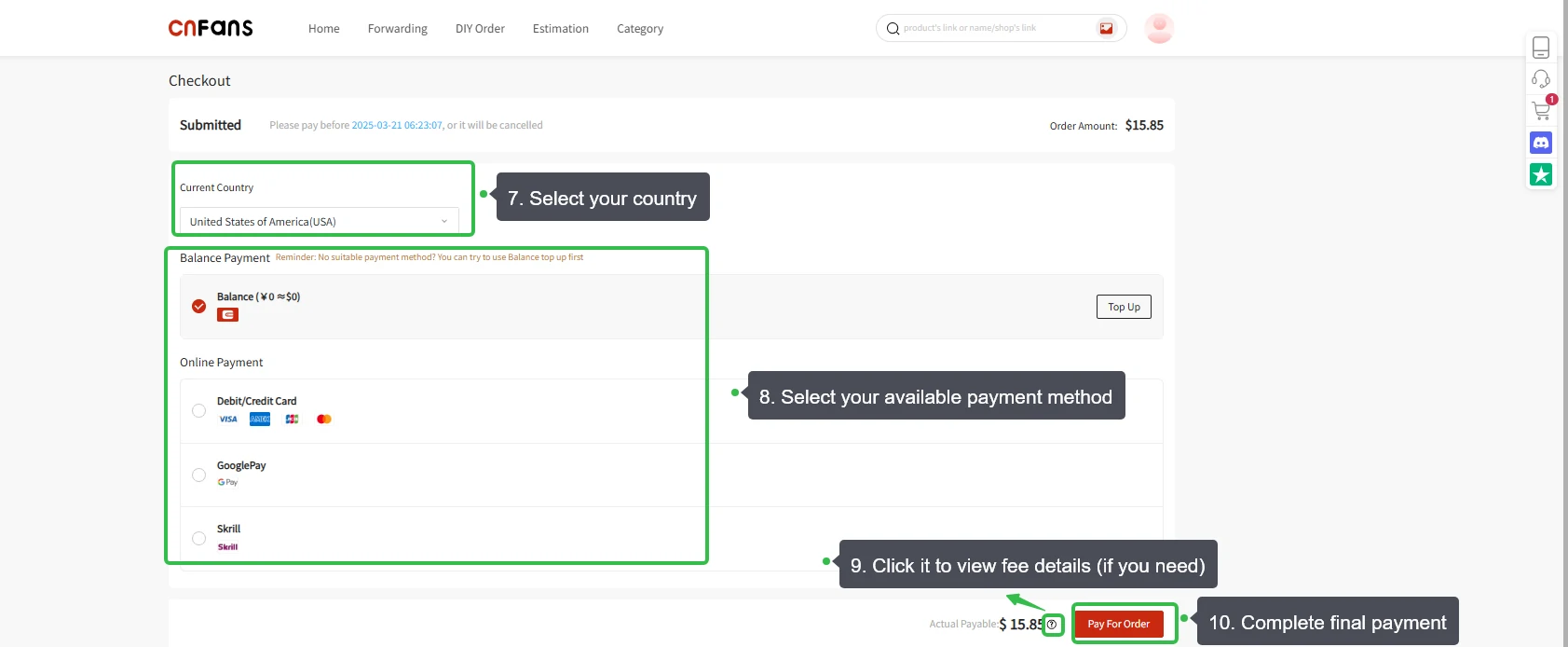
The first payment funds the selected goods and the seller’s delivery to the Chinese warehouse, together with charges disclosed for that order. It excludes international shipping. Check destination, payment method, currency, conversion and fee details before confirming.
Keep the order number and payment record. Submitted or Payment Pending is not proof of a completed payment; check the resulting order status before paying again. Historical payment logos and amounts are examples, not current availability or a quotation.
Whatever the form looks like, keep the order confirmation. It is CNFans's own note of the spec you chose and the price you paid.
Purchase and warehouse
Step 4. The agent accepts the order and purchases
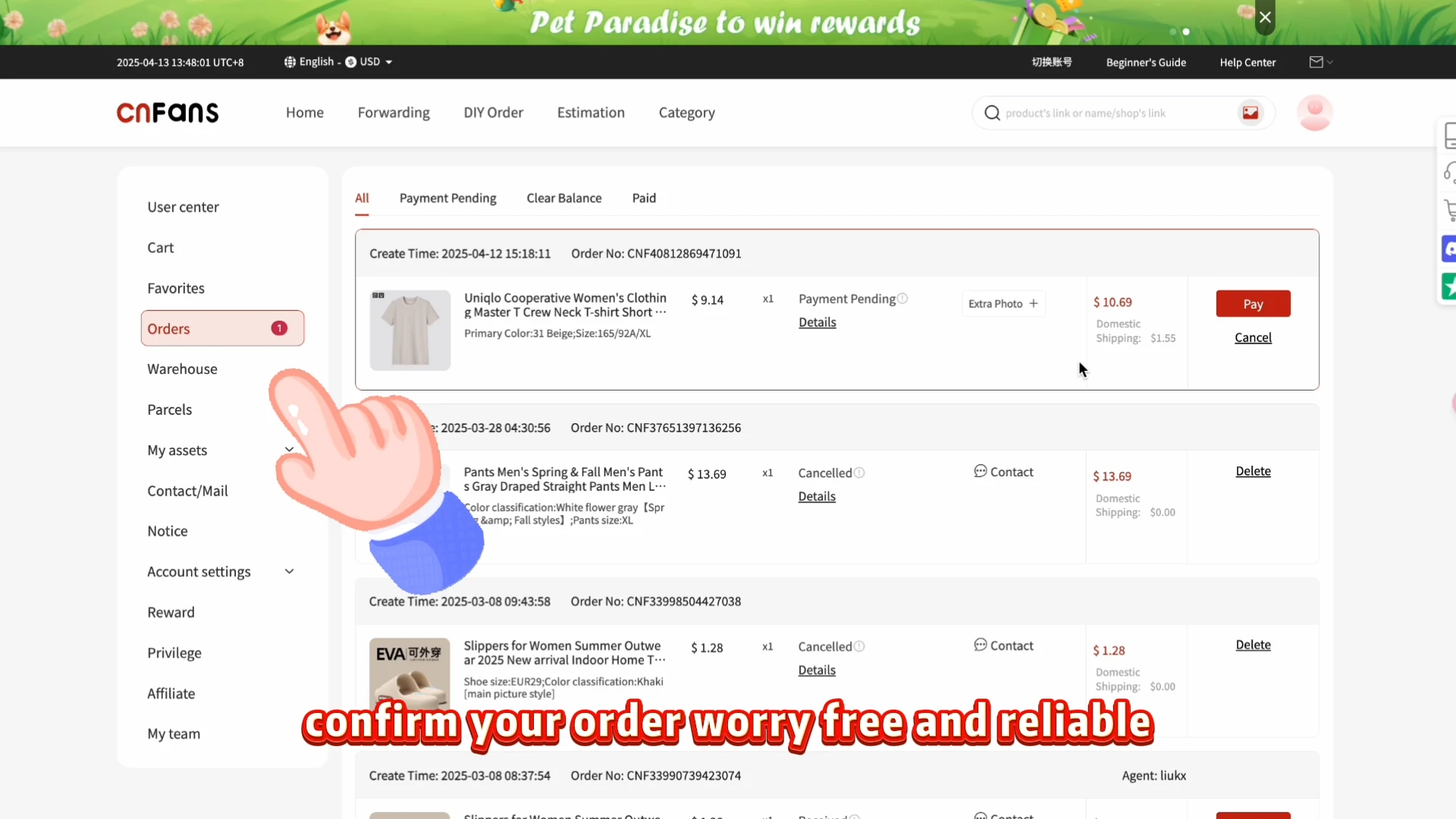
After payment, CNFans accepts the request and purchases from the seller. Check the order’s progress in Orders and read any message about stock, option changes or additional charges. A paid request and a completed seller purchase are different stages.
If the selected option is unavailable, ask for the proposed replacement or cancellation terms before agreeing. Keep the exact replacement specification, refund amount, any retained fee and the refund destination in the order record.
Purchase and warehouse
Step 5. The seller sends the goods to the warehouse
After purchase, the seller dispatches the item to a CNFans warehouse in China. This is domestic transport, not the international parcel to your address. A purchase confirmation does not prove dispatch, and a courier delivery scan does not prove the item has finished warehouse processing.
Check the seller’s dispatch estimate and the order update. If progress stops, use the item and order numbers to ask which hand-off is outstanding. Avoid setting a guaranteed arrival date from a different buyer’s order.
If a seller cannot supply the option, ask the agent to confirm whether the order can be cancelled or substituted. Before accepting a remedy, check the refund amount, any retained charge, the receiving account or payment method, and the expected processing time. Keep the response with the original order.
Purchase and warehouse
Step 6. Inspect the arrival photos and Warehouse record
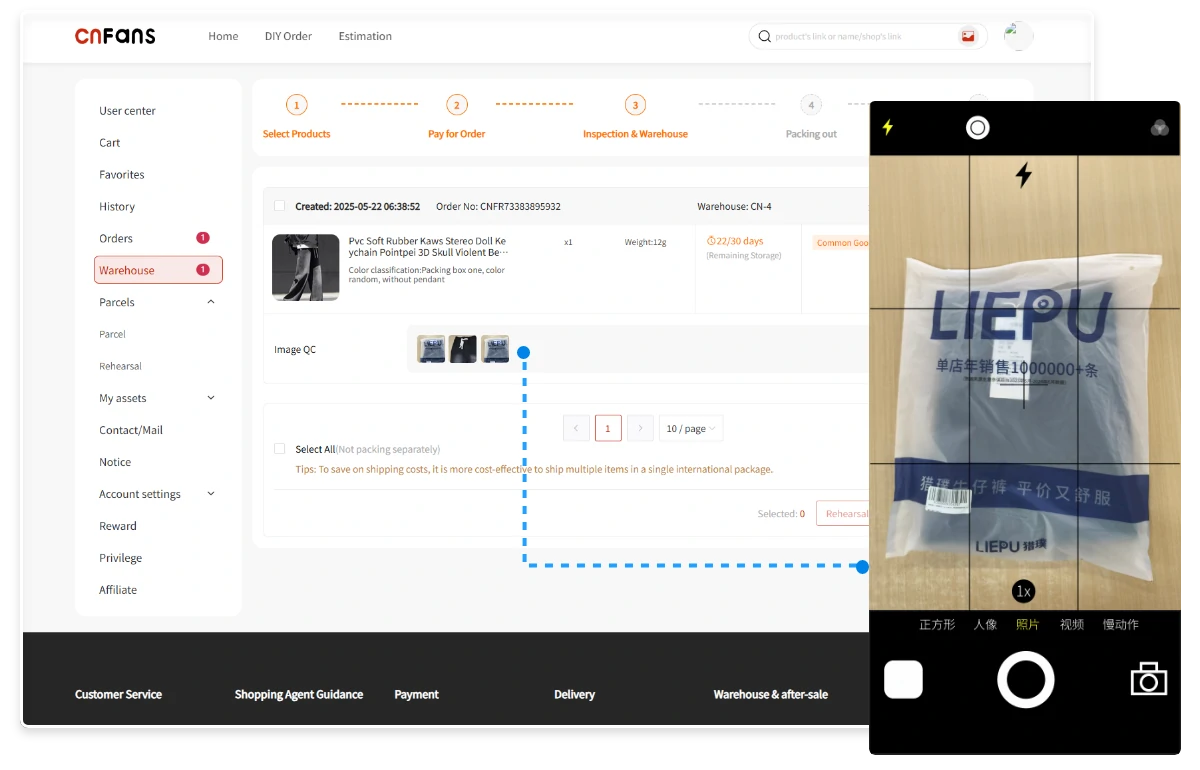
The official sequence next places inspection and warehousing after receipt. Open Warehouse and the available QC photos, then compare the actual item with the saved option, quantity, size label and requested details. Check the item record and any storage deadline.
Request a specific missing view or measurement if needed, confirming its availability and charge first. Resolve discrepancies before international dispatch where possible. QC photographs do not prove authenticity, hidden performance or a right to a free return.
If something is off, raise it before international shipping. The item is still in China, which may make a return more practical, but the seller’s acceptance and any charge must be confirmed. Send the exact mismatch and supporting photos rather than paying to move an unresolved item. Read the photo checklist.
The international parcel
Step 7. Select warehouse items and request outbound shipping
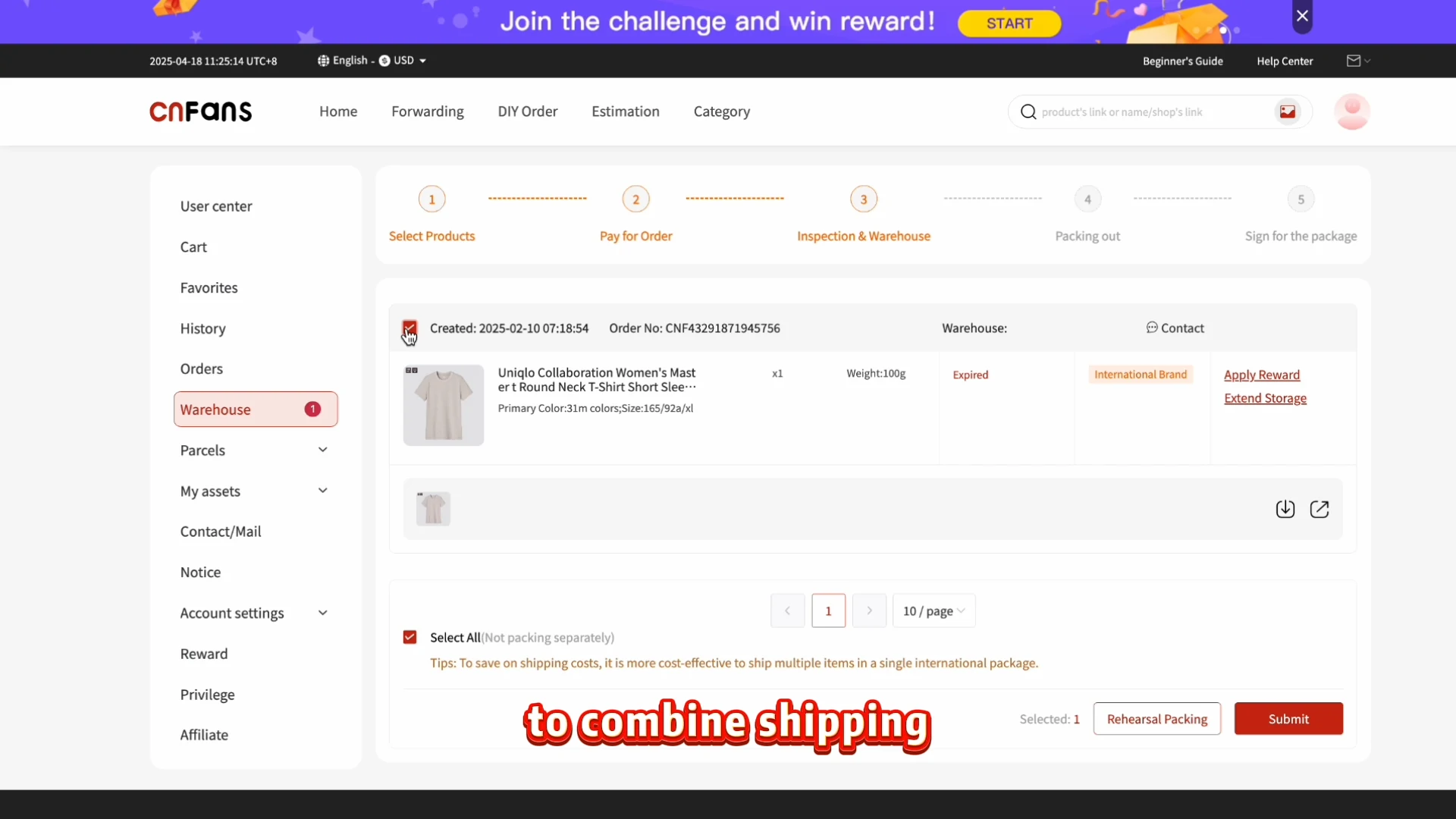
In Warehouse, select the eligible items you want sent together and submit the outbound shipping request. Check the recipient, contents, packing choices and the shipping method offered. In the archived guide this request comes before choosing the route and paying international freight.
Resolve expired storage, incomplete checks or other eligibility warnings first. A ticked item is not automatically ready to ship. Compare combining and separating items; extra bulk or restricted contents can change which routes are available.
The quote is CNFans's own page and decides the shipping price. Packing choices change it: removing shoe boxes or bulky hangers can shrink a parcel, while fragile items may need more padding. Ask what the agent offers rather than assuming. Our shipping page explains weight against size in more detail.
The international parcel
Step 8. Choose the route and pay international shipping
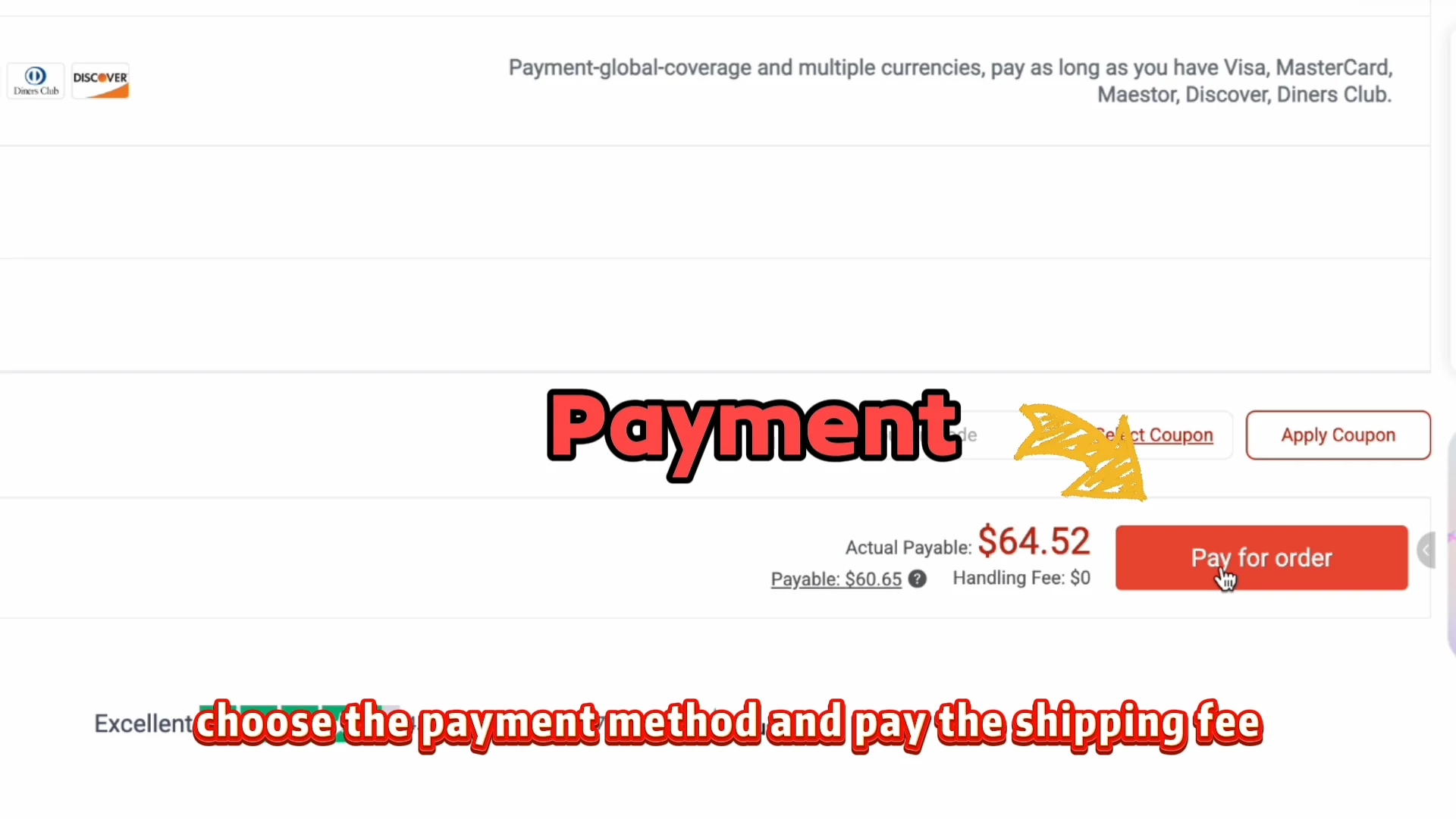
After the outbound request, choose an available logistics route and pay its shipping charge. Check destination coverage, permitted contents, charging weight, dimensions, packing services and any disclosed additional charges. Save the selected quote and payment record.
Follow the account’s stated weighing, packing and settlement procedure: a prepaid estimate may require a later adjustment, while other options use a confirmed quote. Do not treat the goods payment, a cost calculator or the historical amount in the video as the final international bill.
The international parcel
Step 9. Follow dispatch in Parcels and check delivery
After dispatch, open Parcels for the shipment record and tracking. Keep the parcel number and carrier tracking number with the order list. An outbound request or a paid shipping bill is not, by itself, evidence that the carrier has collected the box.
Follow the carrier’s scans and any delivery or import-charge notice through its official channels. On arrival, photograph the parcel and compare contents with the order and warehouse records. Report a discrepancy promptly under the applicable claim terms, keeping packaging and evidence.
A short file of proof for every order
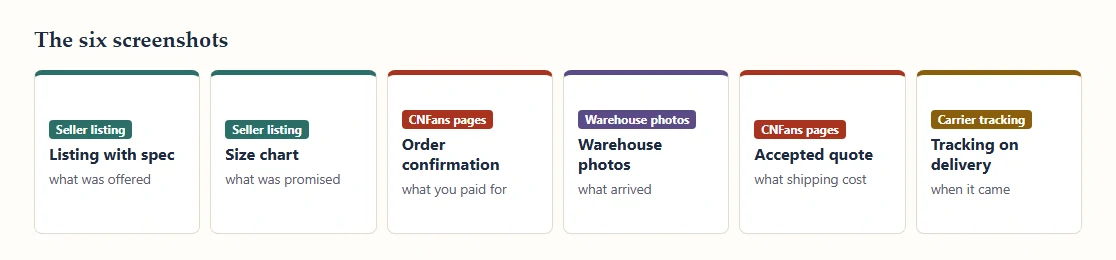
These six records help document a dispute; keep each while the relevant page is available. Save them in one folder per order, named with the date. If a seller changes a listing, an agent updates a status or a carrier rewrites a scan, you still have the version you relied on.
The list: the listing with your spec visible; the size chart; CNFans's order confirmation; the warehouse photos; the shipping quote you accepted; the carrier tracking page on delivery day. Add any customs notice to the same folder.
Which record settles the order option?
The historical CNFans search screen at step one establishes where an item link was entered. It does not establish a current checkout layout, payment method or return entitlement. For those questions, use the live agent pages when ordering is available.
A practical example: the catalogue cover shows four jackets, but the seller menu assigns separate colour labels and prices. Save the selected label, size and listing URL. When the agent imports the link, compare those fields before approving the first payment. If the imported text omits a size, do not assume the cover image supplies it.
At the warehouse, the arrival record is evidence of what was received. The seller’s written listing remains evidence of what was described. If they disagree, send both records with the exact mismatch and request a proposed resolution. The source finder identifies the deciding party; it does not make that party’s answer automatically favourable.