
Home / Spreadsheet
CNFans Spreadsheet categories, sixteen ways in
Every card below leads to current catalog listings of one product type. Under each name is the one detail most worth checking on the seller's own page before the link goes to CNFans.
The full set of product types
Grouped from feet to accessories. Fifteen cards open a category; the womenswear card runs a search instead, which is explained further down.
 SneakersCheck foot length in millimeters on the chart.Category
 Jackets and coatsCompare chest width with a coat you own.Category
 HoodiesFabric weight, if listed, beats the photo.Category
 T-shirtsRead length as well as chest; cuts run boxy.Category
 JeansWaist and inseam, measured flat.Category
 SweatpantsCuffed or open hem changes the length.Category
 Women's searchA search, so add a garment word.Search results
 Sports jerseysFan and player cuts fit differently.Category
 BagsDimensions in centimeters decide it.Category
 Hats and beaniesHead circumference, or stretch.Category
 BeltsTotal length and hole spacing.Category
 EyewearLens width and bridge, in millimeters.Category
 PerfumeLiquids limit which lines can carry it.Category
 JewelryMetal and plating are stated, or not.Category
 WatchesStrap length and case size in mm.Category
 ElectronicsBatteries limit which lines carry it.Category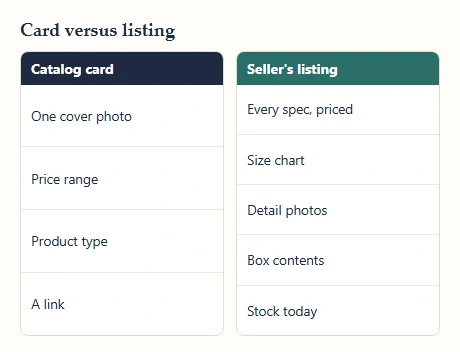
What the card leaves for the listing to answer
Final say here: the seller's listing
A card is built for scanning: one photo, one price range, one link. The seller's listing behind it is built for buying, and it holds everything the card drops. That usually means a spec menu with every color and size, a price for each, a size chart (often as an image near the end of the detail photos), several more photos and a note on what ships in the box.
Open the listing before you decide, every time. The card tells you a listing exists and roughly what it costs; the listing tells you whether the version you want exists at that price today. If the two disagree, go with the listing and treat the card as out of date.
Search words that find the right item
Final say here: the catalog card
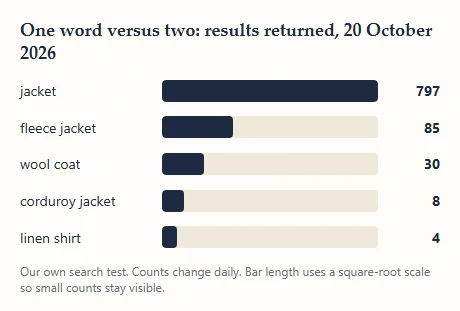
Plain product words beat style labels. On 20 October 2026 the catalog search returned 797 results for jacket, 85 for fleece jacket and 8 for corduroy jacket; tote gave 163 and canvas tote 67. Adding a material word cut the list to something you can read in one sitting, which is usually what you want.
Go too narrow and the list empties: linen shirt returned 4. When that happens, drop the material and add a cut or a use instead (overshirt, work jacket). Brand names are a poor search key here; describe the thing, not the label.
Counts move daily as listings come and go, so treat ours as an example of scale, not a promise.
Why the womenswear card is a search
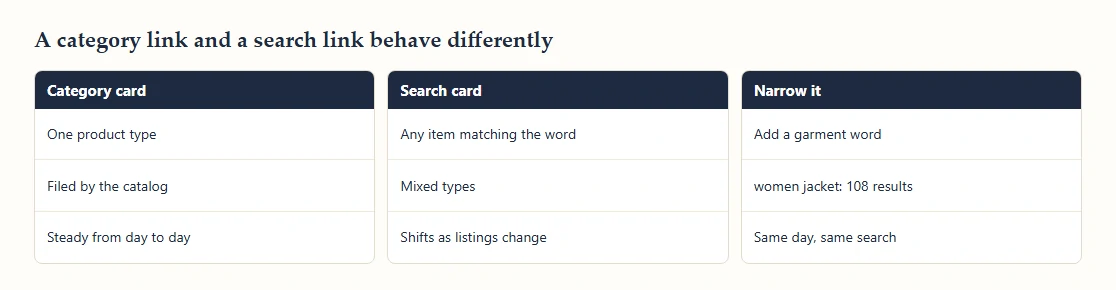
The catalog files items by what they are, not by who wears them, so there is no womenswear category to point at. The womenswear card therefore runs a keyword search for women, which returned 4,126 results on 20 October 2026: dresses, coats, bags and shoes mixed together, ordered by the search rather than by type.
That mix is useful for browsing and tiring for buying. Add a garment word and it settles down quickly; women jacket returned 108 on the same day. The badge on each card tells you which kind of link it is: Category for a filed product type, Search results for a keyword search.
Reading the yuan price range on a card
Final say here: the seller's listing
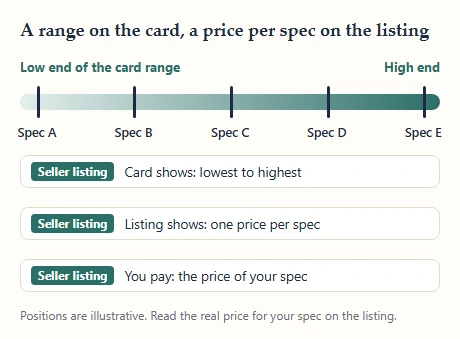
When a card shows two prices, the listing has specs priced differently, and the card is simply showing the cheapest and the dearest. On the first page of results for jacket on 20 October 2026, 14 of 24 cards showed a range rather than a single price.
The low figure is not a promise for your size or color. Larger sizes, a second color or a version with an extra piece can sit at the top of the range. The seller's spec menu has the final say: pick the exact spec there, read its price, and only then convert to your currency.
Remember that the range covers the item alone. Shipping inside China, agent charges and the international line all come on top.
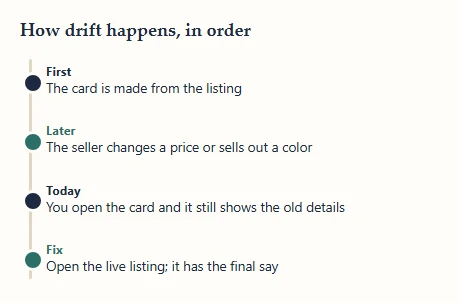
When a card and its listing drift apart
Final say here: the seller's listing
Sellers change things. A price moves, a color sells out, a listing is pulled and reposted under a new link. A catalog card is a snapshot from whenever it was made, so it can lag behind any of these.
Signs of drift are easy to spot once you look: the listing photo no longer matches the card photo, the spec you saw on the card is missing from the menu, or the listing will not open at all. In each case the live listing wins. If it will not load, treat the item as unavailable rather than trying to order it from the card.
Our own wall photos carry the date we pulled them for the same reason.